Quickstart for non-Newtonian pipe flow calculations
All units are SI.
Nomenclature
This notebook provides deep examples for using rheopy for pipe flow. Both tube and slit flow examples with a variety of viscosity models are provided. SI units units are used everywhere. For the variables used here, the units are:
\(\eta = \left< Pas \right>\)
\(\sigma = \left< Pa \right>\)
\(\dot{\gamma} = \left< s^{-1} \right>\)
\(\Delta P = \left< Pa \right>\)
\(Q = \left< \frac{m^3}{s} \right>\)
\(v_z = \left< \frac{m}{s} \right>\)
\(length = \left< m \right>\)
\(radius = \left< m \right>\)
[1]:
import numpy as np
import matplotlib.pyplot as plt
%matplotlib inline
from ipywidgets import interact, interactive, fixed, interact_manual
import ipywidgets as widgets
from IPython.display import display, Math, Latex
import rheoflow
Step 1 - Specify a viscosity model
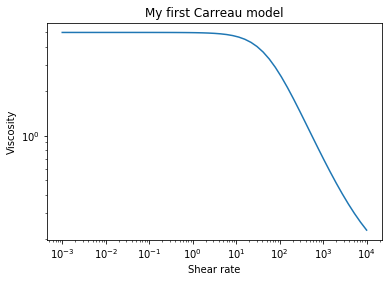
The variable (object) name is up to the user. Here we use my_carreau_model as the name for a Carreau viscosity model with associated parameters.
The details of rheoflow.viscosity.carreau may be viewed by typing help(rheoflow.viscosity.carreau). A list of all viscosity models currently implemented may be accessed by typing help(rheoflow.viscosity).
The python code is all viewable in viscosity.py
[2]:
my_carreau_model = rheoflow.viscosity.carreau('My first Carreau model',
                    eta0=5.,etainf=.11,reltime=.02,a=1.3,n=.3)
Step 2 - Specify a pipe using the viscosity model
The variable (object) name is up to the user. Here we use my_carreau_tube as the name for a laminar pipe flow object with associated parameters. The viscosity model defined (instantiated) above is used.
The pipe has the following attributes:
radius = 0.01 m, length = 1.0 m, fluid density = 1000 kg/m^3
[3]:
my_carreau_tube = rheoflow.pipe.laminar('my laminar flow pipe',density=1000.,
                               radius=.01,length=1.0,viscosity=my_carreau_model)
Step 3 - use the pipe flow object
Initially, neither pressure drop or flow rate were specified.
[4]:
print(my_carreau_tube)
Name =my laminar flow pipe
Radius =0.01
Length =1.0
Pressure drop =None
Flow rate =None
Shear rate wall = None
Specifiy a pressure drop
[5]:
my_carreau_tube.pressure_drop = 20000.
[6]:
print(my_carreau_tube)
Name =my laminar flow pipe
Radius =0.01
Length =1.0
Pressure drop =20000.0
Flow rate =1.782691971171862e-05
Shear rate wall = 23.673966897448867
Accessing attributes of a pipe object
[7]:
my_carreau_tube.q
[7]:
1.782691971171862e-05
[8]:
my_carreau_tube.pressure_drop
[8]:
20000.0
[9]:
my_carreau_tube.radius
[9]:
0.01
[11]:
my_carreau_tube.shear_rate_wall
[11]:
23.673966897448867
[12]:
my_carreau_tube.shear_stress_wall
[12]:
100.0
Modifying attributes of a pipe object
[13]:
my_carreau_tube.q = .0001
[14]:
print(my_carreau_tube)
Name =my laminar flow pipe
Radius =0.01
Length =1.0
Pressure drop =65281.39307599825
Flow rate =0.0001
Shear rate wall = 157.32118720688686
[15]:
my_carreau_tube.pressure_drop = 40000.
[16]:
print(my_carreau_tube)
Name =my laminar flow pipe
Radius =0.01
Length =1.0
Pressure drop =40000.0
Flow rate =4.376689029902029e-05
Shear rate wall = 62.29932871052237
A few convenience plots
[18]:
my_carreau_model.visc_plot()
[20]:
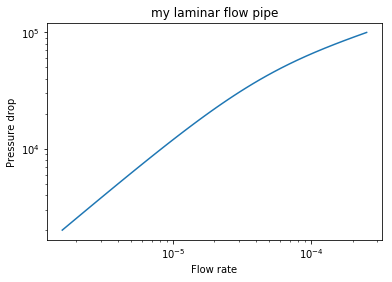
my_carreau_tube.q_plot(pressure_drop_min=2000.,pressure_drop_max=100000.)
[21]:
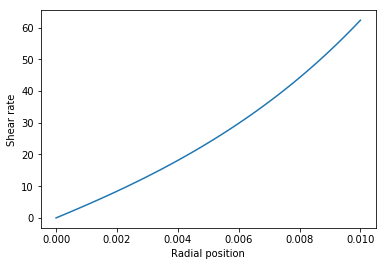
my_carreau_tube.shear_rate_plot()
[22]:
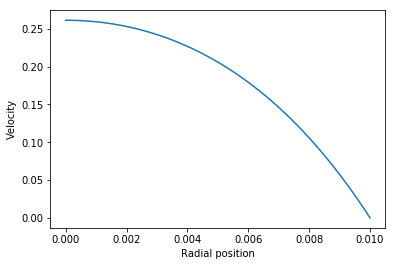
my_carreau_tube.vz_plot()
[ ]: